
This guide explains the ten essential Microsoft 365 security controls we recommend for charities to reduce cyber risk, improve governance and strengthen long-term resilience.
Bunker Snapshot - SharePoint & Teams Governance at a glance
Estimated reading time 🕒 45 seconds
Everything you need to know about this security control in under 60 seconds.
Business impact
🔴 Security improvement
🔴 Risk reduction
🟢 Operational impact
High
High
Low
Related Controls
Next Steps
Review your Microsoft Teams and SharePoint environment, identify unnecessary sharing and permissions, and implement governance policies to control collaboration securely.
Charity Insight
Many charities create new Teams and SharePoint sites for every project or department, but over time this can lead to duplicated content, excessive permissions and sensitive information being shared more widely than intended. A clear governance strategy helps keep your digital workplace secure, organised and easy to manage.
What it does
Ensures Microsoft Teams and SharePoint are securely configured, organised and governed by controlling permissions, sharing, site creation and data lifecycle.
Why it matters
Without proper governance, sensitive information can be overshared, duplicated or left accessible to the wrong people. Good governance keeps collaboration secure while maintaining productivity.
Time to implement
⏱ 4–8 hours
(Depending on the number of Teams, SharePoint sites and governance policies.)
Who it affects
All Microsoft 365 users who create, share or collaborate using Microsoft Teams, SharePoint and OneDrive.
Implementation difficulty
Licensing
Core governance capabilities are included with Microsoft 365 Business Premium. Advanced lifecycle management, retention and compliance features may require Microsoft Purview or Microsoft 365 E5 licensing.
Business benefit
Improves control over organisational information, reduces the risk of accidental data exposure, supports compliance with UK GDPR and enables staff and volunteers to collaborate securely and confidently.
What it is
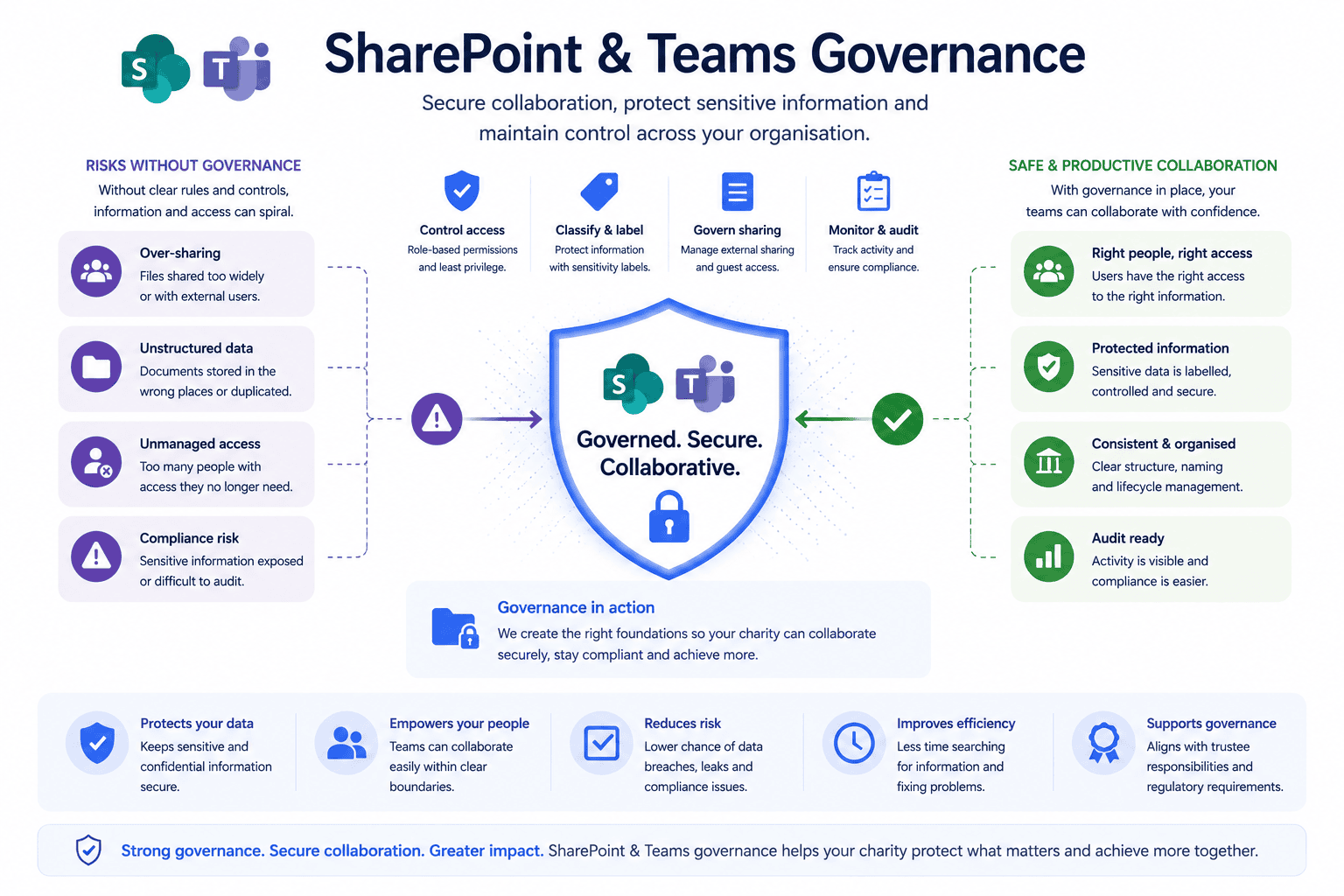
SharePoint & Teams Governance is the process of defining how your organisation creates, stores, shares and manages information within Microsoft 365.
This includes:
- Team creation policies
- Permission management
- External sharing controls
- Document libraries
- Site ownership
- Information lifecycle
- Retention policies
- File naming standards
Good governance ensures information remains secure, organised and accessible throughout its lifecycle.
Why it matters
Charities generate thousands of documents every year.
Policies.
Funding applications.
Board papers.
Volunteer records.
Donor information.
Without governance, these files quickly become difficult to manage, increasing the risk of:
- Sensitive information being shared inappropriately.
- Duplicate documents.
- Outdated policies remaining in use.
- Former staff retaining access.
- Time wasted searching for information.
Strong governance protects information while improving productivity.
Common mistakes
- Allowing anyone to create new Teams.
- Never reviewing permissions.
- Sharing files externally without controls.
- Leaving inactive Teams in place.
- Storing sensitive documents in personal OneDrive accounts.
- Having no document retention policy.
Bunker's Recommended Approach
Technology alone cannot solve governance challenges.
We recommend creating clear ownership for every Team and SharePoint site, implementing sensible permission structures and regularly reviewing how information is stored and shared.
Governance should support collaboration—not restrict it.
The objective is to help staff find the information they need quickly while ensuring sensitive organisational data remains appropriately protected.
One of the biggest issues we see isn't poor technology it's uncontrolled growth. Over time, charities naturally create new Teams, SharePoint sites and document libraries to support projects, fundraising campaigns and operational activities. Without regular governance reviews information becomes increasingly difficult to manage. A structured governance approach keeps Microsoft 365 organised, secure and easy to use.
How We Helped a UK Charity Improve Microsoft 365 Governance
During a Microsoft 365 Security Review, we found a charity had more than 70 Microsoft Teams, many of which were inactive, duplicated or owned by former employees.
Permissions had never been reviewed and sensitive documents were stored across multiple locations.
Working with the charity, we:
- Reviewed Team ownership.
- Removed inactive Teams.
- Standardised SharePoint document libraries.
- Introduced permission reviews.
- Restricted external sharing.
- Created governance guidance for future Team creation.
The result was a more organised Microsoft 365 environment that improved collaboration while reducing security and compliance risks.
Ready to review your Microsoft 365 security?
What is SharePoint & Teams Governance
SharePoint & Teams Governance is the process of managing how information is created, shared, accessed and retained within Microsoft 365. It helps organisations maintain security, improve collaboration and reduce information management risks.
Why is governance important for charities?
Charities manage sensitive donor, beneficiary, employee and trustee information. Governance ensures this information is stored securely, accessed appropriately and retained in line with organisational and legal requirements.
Can Microsoft Teams become difficult to manage?
Yes. Without governance, organisations often accumulate inactive Teams, duplicate workspaces and inconsistent permissions, making information harder to find and increasing security risks.
Should external sharing be disabled?
Not necessarily. External sharing is often essential when working with trustees, partners and suppliers. The key is implementing appropriate controls so information is only shared with authorised individuals.
How often should governance be reviewed?
We recommend reviewing SharePoint and Teams governance at least every six months, including permissions, Team ownership, external sharing and inactive workspaces.
How can Bunker help?
Bunker helps UK charities design practical Microsoft 365 governance strategies that improve collaboration while protecting sensitive information. As part of our Microsoft 365 Security Review, we assess permissions, sharing, ownership and document management to ensure Microsoft 365 remains secure and well organised.
Bunker Technical Solutions Cyber Security Team | Last reviewed: July 2026
