
This guide explains the ten essential Microsoft 365 security controls we recommend for charities to reduce cyber risk, improve governance and strengthen long-term resilience.
Bunker Snapshot - Endpoint Protection at a glance
Estimated reading time 🕒 45 seconds
Everything you need to know about this security control in under 60 seconds.
Business impact
🔴 Security improvement
🔴 Risk reduction
🟢 Operational impact
Very High
Very High
Low
Related Controls
Next Steps
Review all managed devices, enable Microsoft Defender protection, ensure security policies are applied consistently and confirm devices are reporting a healthy security status.
What it does
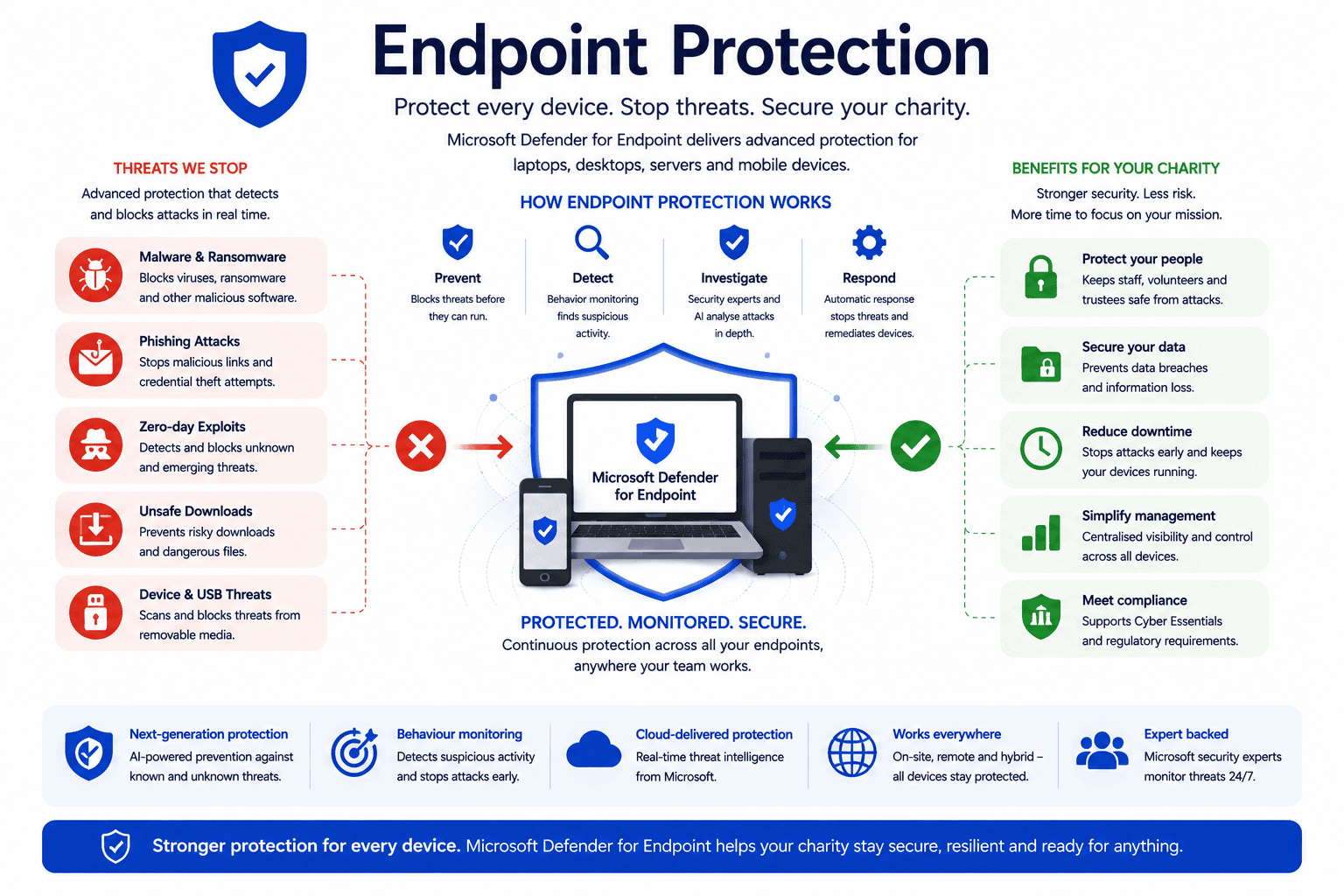
Protects laptops, desktops and mobile devices against malware, ransomware and other cyber threats using Microsoft Defender and advanced endpoint security controls.
Why it matters
Every device connected to your Microsoft 365 environment represents a potential entry point for attackers. Effective endpoint protection helps detect, prevent and respond to threats before they impact your organisation.
Time to implement
⏱ 2–6 hours
(Depending on the number of devices and current management platform.)
Who it affects
All staff, volunteers and trustees using organisation-managed Windows, macOS and mobile devices to access Microsoft 365.
Implementation difficulty
Licensing
Included with Microsoft 365 Business Premium. Advanced endpoint detection and response (EDR) features are available with Microsoft Defender for Endpoint and selected Microsoft 365 enterprise licences.
What it is
Endpoint Security protects the computers and mobile devices that access your Microsoft 365 environment.
Using Microsoft Intune and Microsoft Defender, charities can:
- Manage Windows and mobile devices.
- Deploy security policies automatically.
- Encrypt devices with BitLocker.
- Ensure operating systems remain up to date.
- Detect malware and ransomware.
- Remotely lock or wipe lost devices.
Rather than relying on users to manage security themselves, Endpoint Security helps ensure every device meets your organisation’s security requirements.
Why it matters
A single compromised laptop can expose donor records, financial information and beneficiary data.
Whether staff work from home, travel between locations or use charity-owned devices in the office, every endpoint should meet the same security standards.
Strong Endpoint Security reduces cyber risk by ensuring devices remain secure before they are allowed to access Microsoft 365.
Common mistakes
- Allowing unmanaged personal devices to access Microsoft 365.
- Delaying operating system updates.
- Not encrypting laptops with BitLocker.
- Relying on users to install security updates.
- Never reviewing device compliance.
- Failing to remove lost or stolen devices promptly.
Bunker's Recommended Approach
Endpoint Security should combine Microsoft Intune, Microsoft Defender and Conditional Access to create a layered approach.
We recommend ensuring all organisation-owned devices are centrally managed, encrypted and automatically updated before being granted access to Microsoft 365.
Policies should also be reviewed regularly to support new devices, changing working practices and evolving cyber threats.
One of the biggest risks we see isn't sophisticated hacking, it's unmanaged devices. Charities often have laptops that haven't been updated, devices used by volunteers or equipment that still has access after it's been retired. Effective Endpoint Security gives organisations visibility and control over every device accessing Microsoft 365.
How We Helped a UK Charity Improve Endpoint Security
During a Microsoft 365 Security Review for a regional charity, we found several laptops were missing security updates and encryption, while some former devices still had access to organisational data.
Working with the charity, we:
- Enrolled devices into Microsoft Intune.
- Enabled BitLocker encryption.
- Applied Microsoft Defender endpoint protection.
- Introduced automated security updates.
- Removed obsolete devices from Microsoft 365.
- Implemented compliance policies before access was granted.
The result was a more secure, centrally managed device estate that reduced cyber risk while simplifying ongoing IT management.
Ready to review your Microsoft 365 security?
What is Endpoint Security?
Endpoint Security protects the laptops, desktops, tablets and mobile devices that connect to your Microsoft 365 environment. It combines security policies, device management and threat protection to reduce cyber risk.
Is Endpoint Security the same as antivirus?
No. Antivirus is only one component of Endpoint Security. Modern Endpoint Security also includes encryption, device compliance, operating system updates, remote management and advanced threat detection.
Can charities manage remote devices securely?
Yes. Microsoft Intune allows charities to manage devices regardless of location, ensuring security policies, updates and compliance requirements are applied consistently whether staff work in the office or remotely.
Why is BitLocker important?
BitLocker encrypts data stored on Windows devices. If a laptop is lost or stolen, encryption helps prevent unauthorised access to sensitive charity information.
How often should Endpoint Security be reviewed?
Endpoint Security should be monitored continuously, with device compliance, updates and security policies reviewed at least monthly to ensure all devices remain protected.
How can Bunker help?
Bunker helps UK charities implement Microsoft Intune, Microsoft Defender and Endpoint Security policies that protect devices while supporting flexible and secure ways of working. As part of our Microsoft 365 Security Review, we assess your current device security and recommend practical improvements.
Bunker Technical Solutions Cyber Security Team | Last reviewed: July 2026
