
Backup and recovery for charities is essential for protecting Microsoft 365 data from accidental deletion, ransomware, account compromise and other forms of data loss. A strong backup strategy should protect critical information across Exchange, OneDrive, SharePoint and Teams while giving your charity a clear, tested process for recovering data when something goes wrong.
This guide explains the ten essential Microsoft 365 security controls we recommend for charities to reduce cyber risk, improve governance and strengthen long-term resilience.
Bunker Snapshot - Data Backup & Recovery at a glance
Estimated reading time 🕒 45 seconds
Everything you need to know about this security control in under 60 seconds.
Business impact
🔴 Security improvement
🔴 Risk reduction
🟢 Operational impact
High
Very High
Low
Related Controls
Next Steps
Review your current Microsoft 365 backup strategy, confirm which workloads are protected and test your ability to recover emails, files and Teams data.
Did you know?
Microsoft protects the availability of Microsoft 365, but under the Shared Responsibility Model, your organisation is responsible for protecting and recovering its own data. A dedicated backup solution helps recover from accidental deletion, ransomware and long-term data loss.
What it does
Protects your Microsoft 365 data by creating secure, independent backups of Exchange Online, SharePoint, OneDrive and Microsoft Teams, enabling rapid recovery from accidental deletion, cyber attacks and data loss.
Why it matters
Microsoft provides service availability, but organisations remain responsible for protecting and recovering their own data. Independent backups help ensure critical information can be restored quickly when needed.
Time to implement
⏱ 1–3 hours
(Depending on the number of users and data volume.)
Who it affects
All Microsoft 365 users, particularly organisations storing business-critical email, documents, Teams conversations and SharePoint data.
Implementation difficulty
LOW
Licensing
Requires a Microsoft 365 backup solution or third-party backup platform. Costs typically depend on the number of licensed users and protected workloads.
What Should Backup and Recovery for Charities Include?
What it is
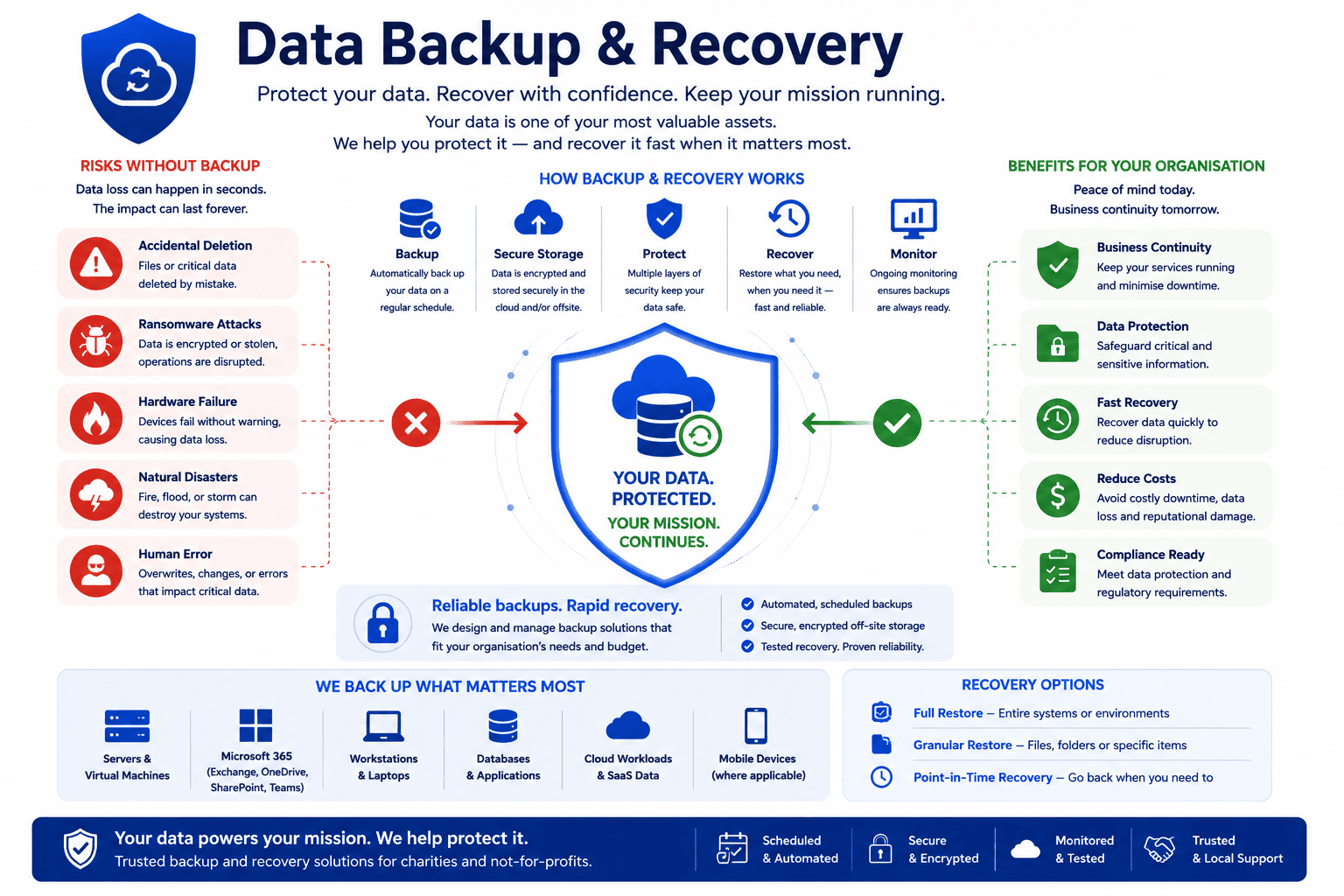
Microsoft 365 Backup & Recovery protects your organisation’s cloud data by creating independent backups of:
- Exchange Online emails
- OneDrive files
- SharePoint sites
- Microsoft Teams data
- Contacts
- Calendars
Unlike Microsoft’s built-in retention features, independent backups provide greater control, longer retention periods and faster recovery when data is accidentally or maliciously deleted.
Why it matters
Charities rely on Microsoft 365 every day to communicate with donors, trustees, staff and volunteers.
If important data is deleted, encrypted by ransomware or removed by a departing employee, recovering it may not always be straightforward.
Independent backups provide reassurance that your organisation can quickly restore critical information and continue operating with minimal disruption.
For organisations handling donor records, grant applications and beneficiary information, reliable backups form an essential part of business continuity planning.
Common mistakes
- Assuming Microsoft automatically backs up everything.
- Relying solely on recycle bins and retention policies.
- Never testing backup restores.
- Only backing up emails while ignoring Teams or SharePoint.
- Not retaining backups for long enough.
- Treating backup as disaster recovery rather than business continuity.
Bunker's Recommended Approach
At Bunker, we recommend Datto SaaS Protection for Microsoft 365 because it provides secure, automated backups and rapid recovery across Exchange Online, SharePoint, OneDrive and Microsoft Teams.
Datto allows organisations to restore individual emails, files, folders or entire workloads quickly and efficiently, helping charities recover from accidental deletion, ransomware or malicious activity without relying solely on Microsoft’s retention capabilities.
Most importantly, backup should never simply exist—it should be regularly tested to ensure recovery works when your organisation needs it most.
One of the most common misconceptions we hear is "Microsoft backs everything up." Microsoft is responsible for keeping the Microsoft 365 service available, but each organisation is responsible for protecting its own data. That's why we recommend an independent backup solution as part of every Microsoft 365 deployment.
How We Helped a UK Charity Protect Microsoft 365 Data
Following a Microsoft 365 Security Review, a charity asked us whether deleted emails and SharePoint files could always be recovered from Microsoft.
After reviewing their environment, we implemented Datto SaaS Protection to provide automated backups across Exchange Online, OneDrive, SharePoint and Microsoft Teams.
The solution now provides:
- Automated daily backups.
- Long-term retention.
- Rapid recovery of individual emails and files.
- Granular restoration without affecting other users.
- Confidence that critical organisational data can be recovered if required.
Rather than relying on default retention policies, the charity now has a dedicated backup strategy aligned with its wider business continuity planning.
Ready to review your Microsoft 365 security?
Doesn't Microsoft back up Microsoft 365 automatically?
Microsoft provides resilience and built-in retention features, but it does not replace the need for an independent backup solution. Organisations remain responsible for protecting their own data from accidental deletion, ransomware and insider threats.
What does Datto SaaS Protection back up?
Datto SaaS Protection protects:
- Exchange Online
- OneDrive
- SharePoint Online
- Microsoft Teams
- Contacts
- Calendars
allowing organisations to restore individual items or complete workloads quickly.
Why do charities need independent backups?
Independent backups provide an additional layer of protection against accidental deletion, malicious activity, ransomware and data corruption. They also support business continuity by enabling rapid recovery when incidents occur..
How quickly can Microsoft 365 data be restored?
No email security solution can stop every phishing email. However, Microsoft Defender for Office 365 significantly reduces the number of malicious emails reaching users by analysing links, attachments, sender reputation and suspicious behaviour.
Should backup restores be tested?
Yes. Backups are only valuable if they can be restored successfully. We recommend testing recovery procedures regularly as part of your charity’s business continuity planning.
How can Bunker help?
Bunker helps UK charities implement, manage and test Microsoft 365 backup solutions using Datto SaaS Protection, ensuring critical organisational data remains protected and recoverable when it’s needed most.
Bunker Technical Solutions Cyber Security Team | Last reviewed: July 2026
