
This guide explains the ten essential Microsoft 365 security controls we recommend for charities to reduce cyber risk, improve governance and strengthen long-term resilience.
Bunker Snapshot - Data Loss Prevention (DLP) at a glance
Estimated reading time 🕒 45 seconds
Everything you need to know about this security control in under 60 seconds.
Business impact
🔴 Security improvement
🔴 Risk reduction
🟡 Operational impact
High
Very High
Medium
Related Controls
Next Steps
Identify the types of sensitive information your charity stores, configure Data Loss Prevention policies and test how Microsoft 365 detects and protects confidential data.
Charity Insight
Many charities don’t experience data breaches because of sophisticated hackers—they occur through accidental sharing of documents, misdirected emails or incorrectly configured permissions. Data Loss Prevention helps prevent these common mistakes before sensitive information leaves your organisation.
What it does
Prevents sensitive information from being accidentally or deliberately shared outside your organisation by monitoring and controlling how data is stored, accessed and shared across Microsoft 365.
Why it matters
Protects donor information, financial records, employee data and other sensitive information, helping reduce the risk of data breaches and supporting compliance with UK data protection requirements.
Time to implement
⏱ 3–6 hours
(Depending on the number of policies and sensitivity labels required.)
Who it affects
All Microsoft 365 users who create, access or share sensitive information through Exchange Online, SharePoint, OneDrive and Microsoft Teams.
Implementation difficulty
Licensing
Basic data protection capabilities are available with selected Microsoft 365 licences. Advanced Data Loss Prevention features require Microsoft 365 Business Premium, Microsoft 365 E5 or Microsoft Purview licensing, depending on the functionality needed.
What it is
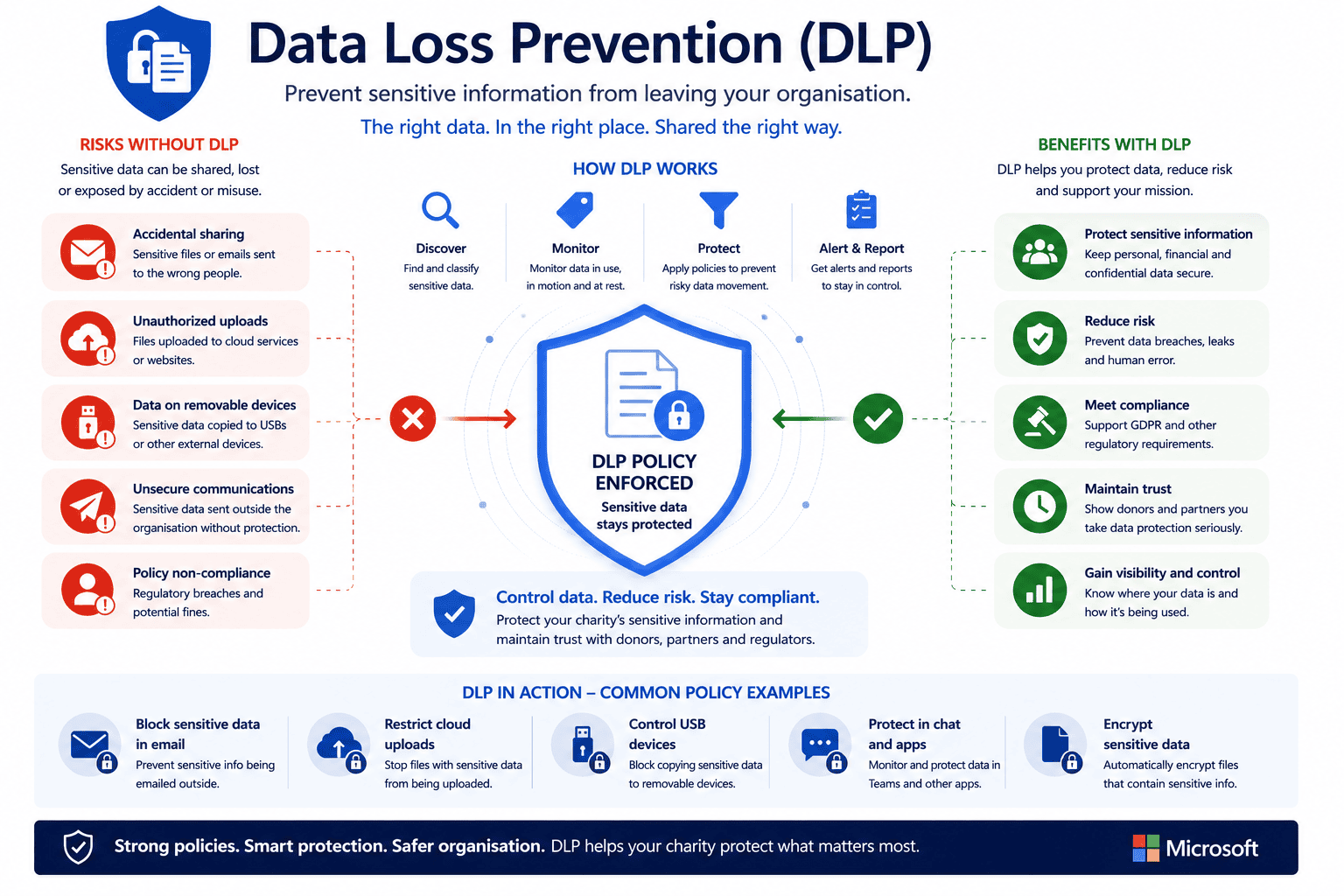
Microsoft 365 Data Loss Prevention (DLP) helps organisations identify, monitor and protect sensitive information across Microsoft 365.
Policies can automatically detect information such as:
- Personal data
- Financial information
- Bank account details
- National Insurance numbers
- Health information
- Payment card information
- Custom organisational data
If sensitive information is shared inappropriately, Microsoft can warn users, block the action or alert administrators.
Why it matters
Charities often process highly confidential information relating to beneficiaries, supporters, staff and funding.
A simple mistake—such as emailing a spreadsheet containing donor information to the wrong recipient—can lead to reputational damage, regulatory investigations and loss of public trust.
DLP helps reduce these risks by preventing accidental data loss before it happens, rather than relying on users to spot every mistake themselves.
Common mistakes
- Only protecting emails while ignoring SharePoint and Teams.
- Creating DLP policies but never testing them.
- Blocking too much, frustrating staff and volunteers.
- Never reviewing policy effectiveness.
- Failing to educate users when policies trigger.
- Assuming DLP replaces staff awareness training.
Bunker's Recommended Approach
Data Loss Prevention should support the way your charity works—not prevent people from doing their jobs.
We recommend starting with monitoring and user notifications before introducing stricter enforcement. This allows organisations to understand how sensitive information is used and refine policies before automatically blocking activity.
Successful DLP combines technology, governance and user education to reduce organisational risk without disrupting productivity.
One of the biggest concerns charities have is that DLP will stop staff from working effectively. In practice, well-designed DLP policies educate users, reduce accidental mistakes and only block genuinely high-risk activity. The goal isn't to make Microsoft 365 harder to use, it's to make handling sensitive information safer.
How We Helped a UK Charity Protect Sensitive Information
During a Microsoft 365 Security Review, we found a charity regularly shared spreadsheets containing donor and financial information through email without any controls to prevent accidental disclosure.
Working with the charity, we:
- Identified sensitive information types.
- Implemented Microsoft 365 DLP policies.
- Introduced user notifications before blocking activity.
- Protected SharePoint, OneDrive and Exchange Online.
- Created reporting for policy violations.
- Reviewed policies with leadership to support governance.
The result was improved protection of sensitive information while allowing staff to continue collaborating confidently using Microsoft 365.
Ready to review your Microsoft 365 security?
What is Data Loss Prevention (DLP)?
Data Loss Prevention (DLP) is a Microsoft 365 security feature that identifies and protects sensitive information. It helps prevent confidential data from being shared accidentally or inappropriately across email, Teams, SharePoint and OneDrive.
What types of information can DLP protect?
DLP can detect and protect a wide range of sensitive information, including personal data, financial information, health records, payment card information, National Insurance numbers and custom information unique to your organisation.
Will DLP stop staff from doing their jobs?
Not if it’s implemented correctly. DLP policies can begin by educating users and providing warnings before moving to stricter enforcement. The aim is to reduce accidental data loss while maintaining productivity.
Does DLP help with UK GDPR?
Yes. DLP supports organisations in protecting personal data and reducing the risk of accidental disclosure. While it doesn’t guarantee GDPR compliance on its own, it forms an important part of a wider information governance strategy.
Which Microsoft licence is required?
Basic DLP capabilities are available with Microsoft 365 Business Premium, while more advanced features require Microsoft 365 E5 licensing.
How can Bunker help?
Bunker helps UK charities design, implement and review Microsoft 365 DLP policies that protect sensitive information while supporting secure collaboration. As part of our Microsoft 365 Security Review, we ensure DLP aligns with your charity’s governance, compliance and operational requirements.
Bunker Technical Solutions Cyber Security Team | Last reviewed: July 2026
