
This guide explains the ten essential Microsoft 365 security controls we recommend for charities to reduce cyber risk, improve governance and strengthen long-term resilience.
Bunker Snapshot - Email Security at a glance
Estimated reading time 🕒 45 seconds
Everything you need to know about this security control in under 60 seconds.
Business impact
🔴 Security improvement
🔴 Risk reduction
🟢 Operational impact
Very High
Very High
Low
Related Controls
Next Steps
Review your Microsoft 365 email security settings, enable anti-phishing and Safe Links policies, and ensure users are protected against malicious email threats.
What it does
Protects your organisation against phishing, malware, spam and business email compromise by securing inbound and outbound email across Microsoft 365.
Why it matters
Email is the most common route for cyber attacks. Effective email security helps prevent malicious messages from reaching users and reduces the risk of account compromise and data loss.
Time to implement
⏱ 2–4 hours
(Depending on existing Exchange Online and Microsoft Defender for Office 365 configuration.)
Who it affects
All Microsoft 365 users who send and receive email, particularly finance teams, trustees, leadership and staff handling sensitive information.
Implementation difficulty
Licensing
Basic email protection is included with Microsoft 365. Advanced phishing protection and threat investigation require Microsoft Defender for Office 365 Plan 1 or Plan 2, available with selected Microsoft 365 licences.
What it is
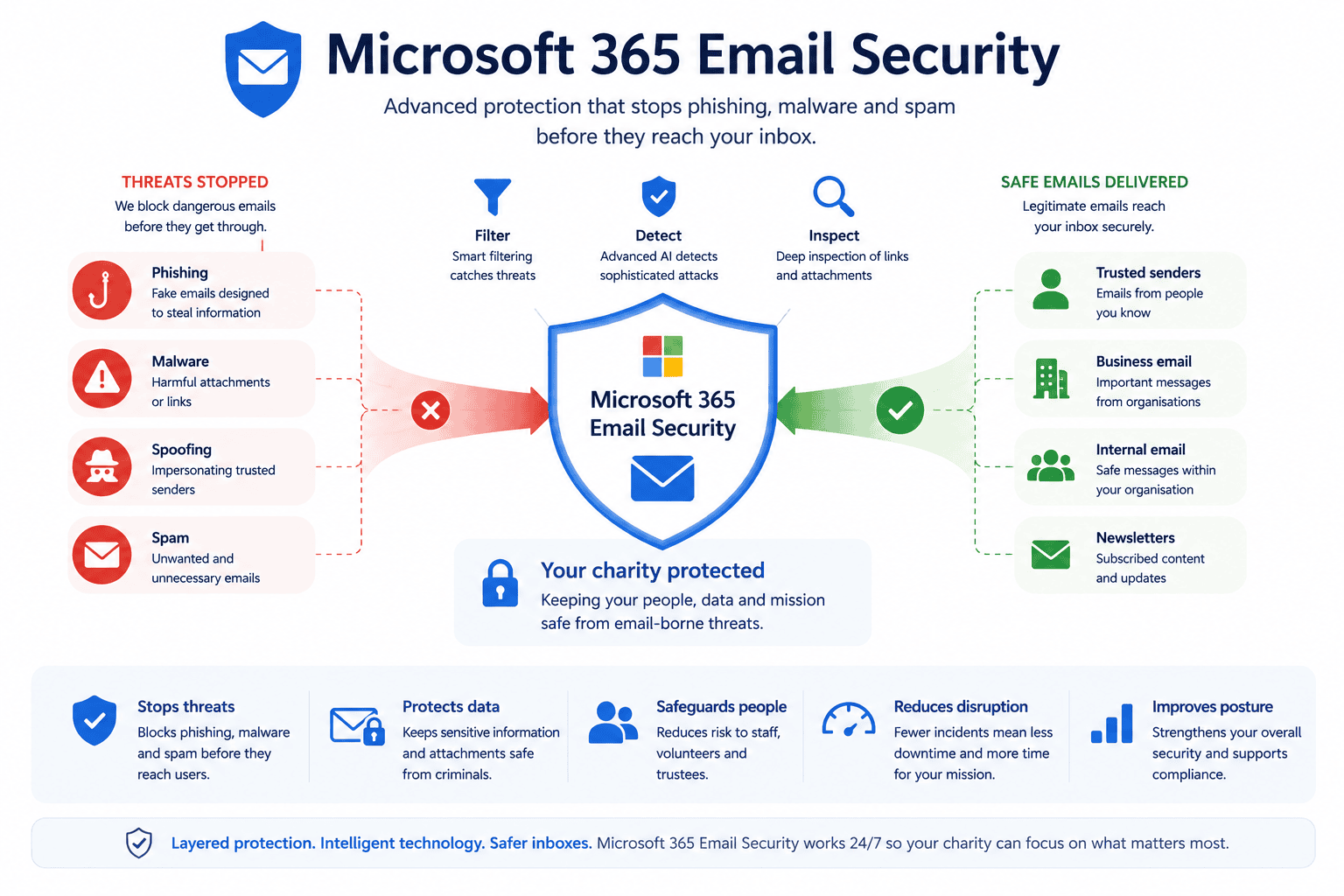
Microsoft 365 Email Security uses Microsoft Defender for Office 365 and Exchange Online Protection (EOP) to protect users against modern email threats.
Key protections include:
- Spam filtering
- Anti-phishing protection
- Safe Links
- Safe Attachments
- Malware scanning
- Business Email Compromise (BEC) detection
- Email authentication (SPF, DKIM and DMARC)
Together, these technologies help prevent malicious emails from reaching users while reducing the risk of account compromise.
Why it matters
Most successful cyber attacks begin with an email.
Whether it’s a fake Microsoft login page, a malicious attachment or an email impersonating your CEO, charities face the same threats as large enterprises.
Effective email security reduces the likelihood of phishing attacks succeeding, protects donor and financial information and helps staff recognise suspicious communications before damage occurs.
Common mistakes
- Relying on default email security settings.
- Not enabling Safe Links or Safe Attachments.
- Missing SPF, DKIM or DMARC configuration.
- Never reviewing email threat reports.
- Focusing on technology without user awareness training.
- Allowing administrator accounts to bypass protections.
Bunker's Recommended Approach
Email security should combine technology with user awareness.
We recommend configuring Microsoft Defender for Office 365 alongside strong email authentication, Multi-Factor Authentication and regular phishing awareness training.
Security policies should be reviewed regularly to ensure they continue protecting against evolving threats while supporting how your charity communicates with staff, volunteers, donors and beneficiaries.
How We Helped a UK Charity Strengthen Email Security
During a Microsoft 365 Security Review for a national charity, we discovered phishing emails were regularly reaching staff inboxes because advanced email protection policies had never been configured.
Working with the charity, we:
- Enabled Safe Links and Safe Attachments.
- Configured anti-phishing and anti-impersonation policies.
- Implemented SPF, DKIM and DMARC.
- Reviewed Exchange Online Protection settings.
- Delivered phishing awareness guidance to staff.
The charity significantly reduced malicious emails reaching users and improved confidence that legitimate communications could be trusted.
Many charities assume Microsoft's default email protection is enough. During Microsoft 365 Security Reviews we often identify additional Defender for Office 365 features, such as Safe Links, Safe Attachments and anti-impersonation policies, that significantly strengthen protection without disrupting users.
Ready to review your Microsoft 365 security?
What is Microsoft 365 Email Security?
Microsoft 365 Email Security combines Exchange Online Protection and Microsoft Defender for Office 365 to protect organisations against phishing, malware, spam, business email compromise and other email-based cyber threats.
Is Microsoft's default email protection enough?
Microsoft provides strong built-in protection, but many organisations benefit from additional configuration. Features such as Safe Links, Safe Attachments, anti-impersonation policies and email authentication significantly improve protection against modern attacks.
What are SPF, DKIM and DMARC?
SPF, DKIM and DMARC are email authentication standards that help verify legitimate emails and reduce email spoofing. Properly configuring these technologies helps protect your charity’s reputation and reduces the likelihood of fraudulent emails appearing to come from your organisation.
Can Microsoft 365 stop phishing emails?
No email security solution can stop every phishing email. However, Microsoft Defender for Office 365 significantly reduces the number of malicious emails reaching users by analysing links, attachments, sender reputation and suspicious behaviour.
How often should email security be reviewed?
We recommend reviewing Microsoft 365 Email Security policies at least monthly. Threats evolve constantly, so email protection should be updated regularly alongside user awareness training and security reporting.
How can Bunker help?
Bunker helps UK charities assess, configure and optimise Microsoft 365 Email Security as part of our Microsoft 365 Security Review. We ensure email protection aligns with your organisation’s risk profile while supporting secure communication with staff, volunteers and supporters.
Bunker Technical Solutions Cyber Security Team | Last reviewed: July 2026
