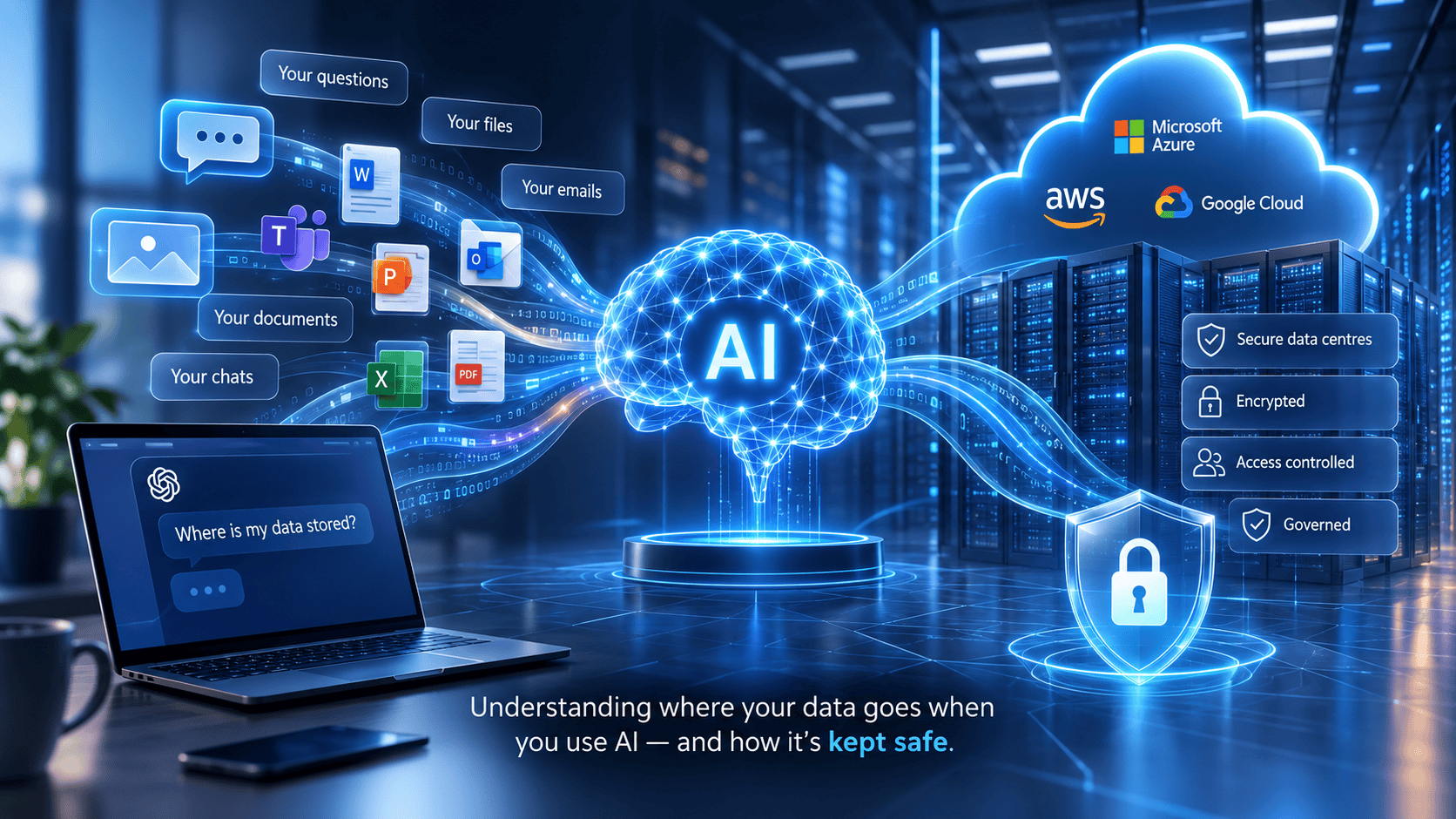
Where Does AI Store Your Data? Everything You Need to Know About AI Privacy
-
17/04/2025
- 19 minutes Read
Everything You Need to Know About AI Privacy
Whether you’re using ChatGPT, Microsoft Copilot, Google Gemini or another AI assistant, one of the biggest questions people ask is:
Where does AI store my data?
The answer depends on which AI platform you’re using, whether you’re using a personal or business account, and how the service has been configured.
Some AI services retain conversations for a period of time, while others allow chat history to be disabled or offer enterprise controls that prevent customer data being used to train AI models.
Understanding how AI stores and processes information is essential if you’re using AI at work, especially if your organisation handles confidential, financial or personal information.
The Short Answer
| Question | Answer |
|---|---|
| Does AI store data? | Yes, many AI platforms store prompts and conversations, although retention policies vary. |
| Where is AI data stored? | Usually in secure cloud data centres operated by the AI provider or its cloud infrastructure partners. |
| Can AI remember me? | Some services remember previous conversations if memory or chat history is enabled, while others do not. |
| Is AI always learning from my data? | Not necessarily. Enterprise AI services often provide controls that prevent customer data being used for model training. |
| Feature | ChatGPT | Microsoft Copilot |
|---|---|---|
| Stores conversations | Yes (depending on settings) | Uses Microsoft 365 data |
| Uses your data to train AI | Depends on account/settings | No (Microsoft 365 Copilot) |
| Accesses company documents | Only if uploaded | Yes, using existing permissions |
| Designed for business | Business & Enterprise plans | Yes |
| Best suited for | General AI assistance | Secure workplace productivity |
What Does AI Actually Know About You?
1. Your Behaviour
AI can analyse how you interact with digital services, including:
- What you search for
- The websites you visit
- The content you read
- What you click, like or share
- How long you spend on particular pages
This information helps AI-powered systems personalise recommendations, search results and advertising.
2. Information You Choose to Share
If you’ve provided information such as your:
- Name
- Email address
- Location
- Job title
- Preferences
AI-powered services may use that information to personalise your experience.
Importantly, AI doesn’t magically know who you are—it only knows what you or connected systems make available.
3. Your Conversations
When you interact with AI tools like ChatGPT or Microsoft Copilot, the prompts you enter may be stored according to the provider’s policies and the type of account you’re using.
For organisations, this makes it important to understand how AI tools handle business information before staff begin using them.
4. Information Already Stored in Your Organisation
Business AI tools work differently from public AI assistants.
For example, Microsoft Copilot can use information your organisation already stores in:
- Outlook
- Microsoft Teams
- SharePoint
- OneDrive
- Word, Excel and PowerPoint
However, Copilot only accesses information a user already has permission to view. It doesn’t bypass Microsoft 365 security or permissions.
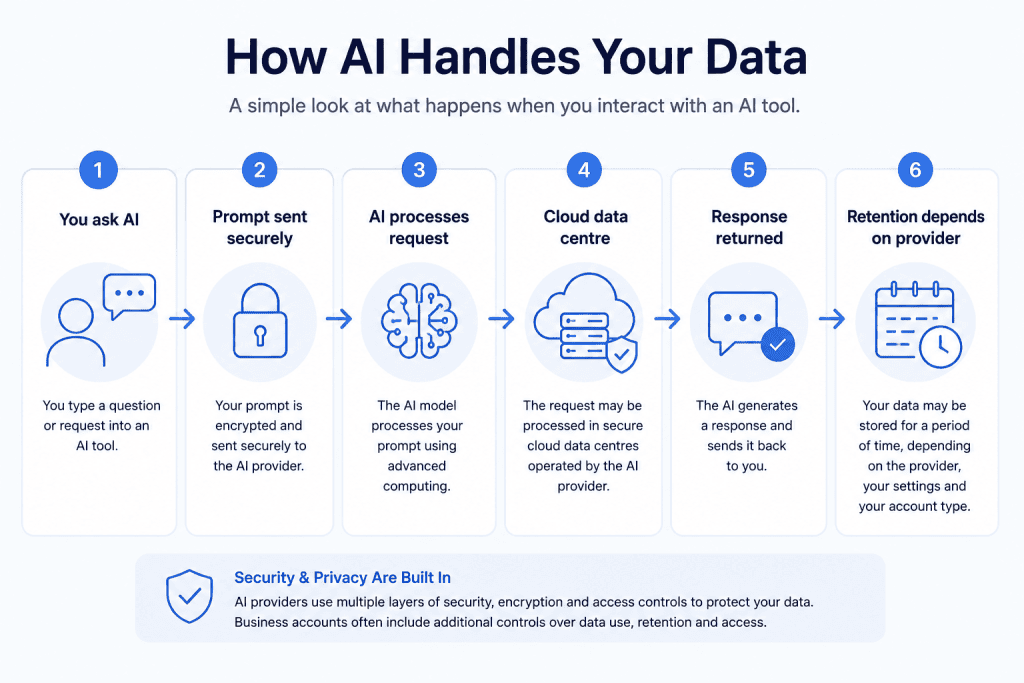
Where Is AI Data Stored?
The answer depends on the AI platform you’re using.
Most modern AI services store and process data in secure cloud data centres operated by the provider or one of the major cloud platforms, such as Microsoft Azure, Amazon Web Services (AWS) or Google Cloud.
However, not all AI tools handle your data in the same way. Where your information is stored, how long it’s retained and whether it’s used to improve AI models can vary significantly between providers and between personal and business accounts.
For organisations, it’s important to understand the difference before staff begin using AI tools with business information.
Cloud Data Centres
Most AI platforms process requests in highly secure cloud environments. Rather than storing information on your computer, your prompts and any generated responses may be processed and temporarily or permanently stored in professionally managed data centres.
These facilities are designed with multiple layers of physical and digital security, including encryption, monitoring, backup systems and access controls.
Business Systems
Business AI tools often work with information already stored within your organisation.
For example, Microsoft Copilot can access information held in:
- Outlook emails
- Microsoft Teams chats and meetings
- SharePoint document libraries
- OneDrive files
- Word, Excel and PowerPoint documents
Importantly, Microsoft Copilot doesn’t create a new copy of your business information. Instead, it works with the data already stored in your Microsoft 365 environment and respects the permissions that are already in place.
This is why reviewing Microsoft 365 permissions before deploying Copilot is so important. If employees already have access to documents they shouldn’t see, AI can make those documents easier to find—but it doesn’t bypass existing security controls.
On-Device AI
Some AI features work entirely on your device.
Examples include predictive text, voice recognition and image processing on modern smartphones and computers.
Because the processing happens locally, less information may need to be sent to the cloud, providing additional privacy benefits in some situations.
Does AI Store Everything Forever?
Not necessarily.
Every AI provider has its own data retention policy. Some services retain conversations for a period of time, while others allow chat history to be disabled or provide enterprise controls that limit how customer data is retained and used.
Before adopting any AI platform, organisations should understand:
- Where data is stored
- How long it is retained
- Whether it is encrypted
- Who can access it
- Whether it is used to train AI models
- How it can be deleted if required
Understanding these questions is essential for organisations handling confidential, financial or personal information.
| AI Platform | Where Data Is Stored | Uses Your Organisation’s Data? | Enterprise Controls Available? |
|---|---|---|---|
| ChatGPT | Cloud data centres | Depends on account type and settings | Yes |
| Microsoft Copilot | Your Microsoft 365 tenant (plus Microsoft cloud processing) | Yes, using existing Microsoft 365 permissions | Yes |
| Google Gemini | Google Cloud infrastructure | Depends on product and account | Yes |
| Claude | Cloud infrastructure | Depends on account and settings | Yes |
Does ChatGPT Store My Conversations?
Yes! but it depends on how you’re using ChatGPT.
Whether ChatGPT stores your conversations depends on the type of account you have and the settings you’ve enabled.
For most personal accounts, ChatGPT can retain your conversation history so you can return to previous chats. If chat history is enabled, your conversations are stored in your account until you delete them or they are removed in accordance with OpenAI’s retention policies.
However, OpenAI also provides options that give users greater control over their data.
Personal ChatGPT Accounts
If you’re using a standard ChatGPT account:
- Your conversations may be saved in your chat history.
- You can delete individual conversations or clear your chat history.
- You can disable “Improve the model for everyone”, which stops your conversations from being used to help improve OpenAI’s models.
- Temporary Chats are available if you don’t want conversations to appear in your history. These chats are retained for a limited period for safety purposes but are not used to improve models.
ChatGPT Business and Enterprise
For organisations, OpenAI offers business-focused plans with stronger privacy controls.
Business and Enterprise customers benefit from features designed for organisational use, including:
- Customer data is not used to train OpenAI’s models by default.
- Administrative controls over users and access.
- Enterprise-grade security features.
- Additional compliance and privacy controls.
This makes ChatGPT Business and Enterprise more suitable for organisations that need to protect confidential business information.
Should Organisations Be Concerned?
The biggest risk isn’t usually the technology—it’s how people use it.
For example, employees may accidentally paste:
- Confidential client information
- Financial reports
- HR records
- Commercially sensitive documents
- Personal data
into an AI assistant without realising the implications.
That’s why every organisation should have clear guidance on:
- Which AI tools staff are allowed to use.
- What information can be entered into AI systems.
- When AI-generated content must be reviewed by a person.
- How AI use is monitored and governed.
Good AI governance allows organisations to benefit from AI while reducing unnecessary risks.
The Bottom Line
ChatGPT can store conversations, but users have far more control than many people realise. The exact behaviour depends on your account type and settings, which is why it’s important to understand how your organisation is using AI before rolling it out more widely.
For charities and businesses handling sensitive information, the safest approach is to establish an AI policy, provide staff training and use business-grade AI services with appropriate governance rather than relying on unmanaged personal accounts.
Did you know?
One of the first questions we ask during an AI Readiness Assessment is:
“Are your staff already using ChatGPT?”
Many organisations discover AI has already been adopted informally, often without policies, training or governance. Understanding current usage is the first step towards introducing AI safely and responsibly.
Does Microsoft Copilot Store My Data?
Yes! but not in the same way as ChatGPT.
Microsoft Copilot doesn’t create a separate database containing copies of all your documents. Instead, it works with the information already stored within your Microsoft 365 environment, including SharePoint, OneDrive, Outlook, Teams and other Microsoft 365 services.
When you ask Copilot a question, it searches the information you already have permission to access and uses Microsoft’s AI services to generate a response.
In other words, Copilot doesn’t know anything your Microsoft 365 account couldn’t already access.
Where Does Copilot Get Its Information?
Microsoft Copilot can use information from across your Microsoft 365 tenant, including:
- Outlook emails and calendars
- Microsoft Teams chats and meeting transcripts
- SharePoint sites and document libraries
- OneDrive files
- Word, Excel and PowerPoint documents
- Contacts and other Microsoft 365 content
The information remains stored within your Microsoft 365 environment. Copilot simply helps you find, summarise and work with it more efficiently.
Does Copilot Use My Data to Train AI?
For Microsoft 365 Copilot, Microsoft states that your prompts, responses and business data are not used to train the foundation models that power the service. Your organisation’s data remains within your Microsoft 365 tenant and is protected by Microsoft’s existing enterprise security, compliance and privacy commitments.
This is one of the key differences between Microsoft 365 Copilot and many consumer AI services.
Why Microsoft 365 Permissions Matter
One of the biggest misconceptions about Copilot is that it creates a security risk by exposing information people couldn’t previously access.
In reality, Copilot respects the permissions that already exist within Microsoft 365.
However, this creates a different challenge.
If users already have access to documents they shouldn’t be able to see—for example, because SharePoint permissions are too broad or files have been overshared—Copilot can make that information much easier to discover.
Copilot doesn’t bypass security.
It simply makes existing access more useful.
That’s why many organisations discover permission issues when preparing for AI adoption.
Before Deploying Microsoft Copilot
Before introducing Copilot, we recommend reviewing your Microsoft 365 environment to ensure:
- SharePoint permissions follow the principle of least privilege.
- Sensitive documents are stored in appropriate locations.
- Microsoft Teams access is properly managed.
- Guest accounts are reviewed regularly.
- Data classification and sensitivity labels are being used where appropriate.
- Staff understand what information is appropriate to use with AI.
Preparing your Microsoft 365 environment before deploying Copilot helps ensure your teams benefit from AI without unintentionally exposing sensitive information.
The Bottom Line
Microsoft Copilot doesn’t store your documents in a separate AI database, nor does it use your organisation’s data to train Microsoft’s AI models. Instead, it securely works with the information already stored in your Microsoft 365 environment.
For most organisations, the biggest risk isn’t Copilot itself—it’s poor Microsoft 365 governance.
If your SharePoint permissions, Teams access or document management are already well controlled, Copilot can become a powerful productivity tool. If they’re not, Copilot can quickly highlight issues that have existed for years.
💡 Related Resource
Planning to introduce Microsoft Copilot?
Before enabling AI across your organisation, review your Microsoft 365 security and permissions.
Our Microsoft 365 Security Framework helps organisations identify overshared SharePoint sites, review permissions, strengthen governance and prepare Microsoft 365 for secure AI adoption.
Is AI Safe for Businesses?
Yes—but only when it’s introduced with the right safeguards.
AI tools such as ChatGPT and Microsoft Copilot can save employees hours each week by helping with research, drafting documents, analysing data and automating routine tasks. However, like any business technology, they also introduce new security, privacy and governance considerations.
The biggest risk isn’t usually the AI itself—it’s how people use it.
Without clear policies and training, employees may unknowingly enter confidential information into AI tools, share sensitive documents or rely on AI-generated content without checking its accuracy.
The good news is that these risks can be managed.
The Biggest AI Risks for Businesses
Before rolling out AI, organisations should consider:
- Confidential information – Could staff accidentally enter customer, financial or HR data into public AI tools?
- Data security – Where is your information stored, and who can access it?
- Permissions – Does AI have access to documents employees shouldn’t be able to see?
- Accuracy – AI can make mistakes or present incorrect information confidently, so important decisions should always be reviewed by a person.
- Compliance – Does your use of AI align with GDPR, contractual obligations and internal policies?
Understanding these risks is the first step towards using AI responsibly.
Four Steps to Safe AI Adoption
Rather than banning AI, we recommend creating a structured approach to adoption.
1. Create an AI Policy
Provide staff with clear guidance on:
- Which AI tools are approved
- What information can and cannot be entered into AI
- When AI-generated content must be reviewed
- Who is responsible for overseeing AI use
2. Review Your Microsoft 365 Environment
If you’re planning to use Microsoft Copilot, review your SharePoint, Teams and OneDrive permissions first.
Copilot respects existing permissions, so it’s important to ensure employees only have access to the information they genuinely need.
3. Train Your Staff
Technology alone isn’t enough.
Employees should understand:
- How AI works
- How to write effective prompts
- How to recognise inaccurate or misleading responses
- How to protect confidential information
4. Monitor and Review
AI adoption isn’t a one-off project.
Regularly review how AI is being used, update policies as the technology evolves and ensure security controls continue to meet your organisation’s needs.
AI Should Support People, Not Replace Them
AI is an incredibly powerful assistant, but it shouldn’t replace human judgement.
Business decisions, financial approvals, safeguarding, legal advice and strategic planning still require people to review, validate and take responsibility for the outcome.
The organisations seeing the greatest success with AI are those using it to augment their teams, allowing employees to spend less time on repetitive administration and more time on high-value work.
The Bottom Line
AI can be used safely in businesses—but success depends on more than choosing the right tool.
It requires clear governance, secure technology, staff training and ongoing oversight.
When these foundations are in place, AI can become a valuable productivity tool that helps organisations work smarter without compromising security or compliance.
💡 How Bunker Can Help
At Bunker, we help organisations adopt AI with confidence.
Whether you’re exploring ChatGPT, preparing for Microsoft Copilot or developing an AI policy, we can help you:
- Assess your AI readiness
- Review Microsoft 365 security and permissions
- Develop practical AI governance policies
- Train staff to use AI safely and effectively
- Identify high-value AI use cases across your organisation
Our goal is simple: help you realise the benefits of AI while protecting your people, your data and your reputation.
Where does AI store data?
Most AI platforms store and process data in secure cloud data centres operated by the provider or one of the major cloud platforms, such as Microsoft Azure, Amazon Web Services (AWS) or Google Cloud. The exact location depends on the AI service you’re using, your account type and the provider’s infrastructure. Business AI services often provide additional controls over where data is processed and how it is retained.
Does AI remember everything I type?
Not always. Some AI platforms retain conversation history so you can return to previous chats, while others allow chat history to be disabled or provide temporary chat modes that aren’t saved in the same way. Enterprise AI services often include additional controls that limit data retention and prevent customer data from being used to improve AI models.
Does Microsoft Copilot store conversations?
Microsoft 365 Copilot works differently from consumer AI tools. It uses the information already stored within your Microsoft 365 environment, such as SharePoint, OneDrive, Outlook and Teams, to generate responses. Microsoft states that prompts, responses and your organisation’s data are not used to train its foundation AI models, and Copilot respects your existing Microsoft 365 permissions.
Is AI data stored in the cloud?
In most cases, yes. AI services typically process requests in secure cloud infrastructure because of the computing power required to run large language models. Some AI features, particularly on smartphones and modern computers, can also process information locally on the device without sending everything to the cloud.
Can AI access confidential documents?
Only if the AI has been given access to them.
For example, Microsoft Copilot can only work with documents that a user already has permission to access within Microsoft 365. Public AI tools such as ChatGPT cannot access your organisation’s files unless you choose to upload them or connect them to another service.
Can AI see my files?
AI cannot automatically see everything on your computer.
Consumer AI tools only have access to files you intentionally upload or connect. Business AI platforms such as Microsoft Copilot work with information stored in your Microsoft 365 environment, but only within the permissions already assigned to each user.
Does ChatGPT train on my data?
It depends on your account.
For personal ChatGPT accounts, OpenAI provides settings that allow users to control whether conversations are used to help improve its models. Business and Enterprise customers have stronger privacy protections, and OpenAI states that customer data from these plans is not used to train its models by default.
How can organisations protect sensitive information when using AI?
The safest approach is to combine technology with clear governance. Organisations should:
- Create an AI usage policy.
- Train staff on the safe use of AI.
- Review Microsoft 365 permissions before deploying Copilot.
- Avoid entering confidential or personal information into public AI tools unless approved.
- Regularly review AI usage, security settings and access controls.
AI can deliver significant productivity benefits, but it should always be introduced with appropriate security, governance and staff awareness.
Is AI safe to use in charities?
Yes, provided it’s implemented responsibly. Charities should ensure staff understand what information can be shared with AI tools, review Microsoft 365 permissions before deploying Microsoft Copilot, establish an AI policy and provide appropriate training. With the right governance, AI can improve productivity while helping protect donor, beneficiary and organisational data.
Should my organisation create an AI policy?
If employees are already using AI tools—or you’re planning to introduce them—the answer is almost certainly yes. An AI policy sets expectations around approved tools, acceptable use, handling confidential information, human oversight and compliance. It provides staff with clear guidance and helps reduce the risks associated with unmanaged AI adoption.
How Can Bunker Help?
At Bunker, we help organisations adopt AI securely and confidently. Whether you’re exploring ChatGPT, preparing for Microsoft Copilot or developing an AI governance framework, we can help you review your Microsoft 365 environment, strengthen security, create practical AI policies and train your teams to use AI safely.
Our goal isn’t simply to introduce AI—it’s to ensure your organisation can benefit from it without compromising security, privacy or compliance.
💡 How Bunker Can Help
As organisations adopt AI tools like ChatGPT and Microsoft Copilot, understanding where your data is stored is only one part of the picture.
It’s equally important to understand:
- What information staff can safely enter into AI.
- Whether your Microsoft 365 environment is ready for Copilot.
- How to protect confidential data.
- What governance policies should be in place.
- How trustees and leadership teams can oversee AI adoption responsibly.
At Bunker, we help organisations introduce AI securely through AI governance, Microsoft 365 security reviews and practical adoption workshops, ensuring innovation doesn’t come at the expense of security or compliance.

How Long Does It Take to Get Cyber Essentials Certification in the UK?

How Much Does IT Support Cost for a UK Charity in 2026?
What Is Microsoft Secure Score? A Guide for UK Charities
Charity Commission Risk Assessment 2026: What Trustees Need to Know About Cyber Security and Ai

Why Remote Staff and Volunteers Increase Cyber Risk for Charities – And What You Can Do About It