
Microsoft 365
Data Protection Framework
Know where your sensitive data is?
Understand who can access it?
Protect it appropriately. Prepare it for Ai
A practical five-stage framework to help organisations discover, classify, protect, monitor and govern sensitive information across Microsoft 365.
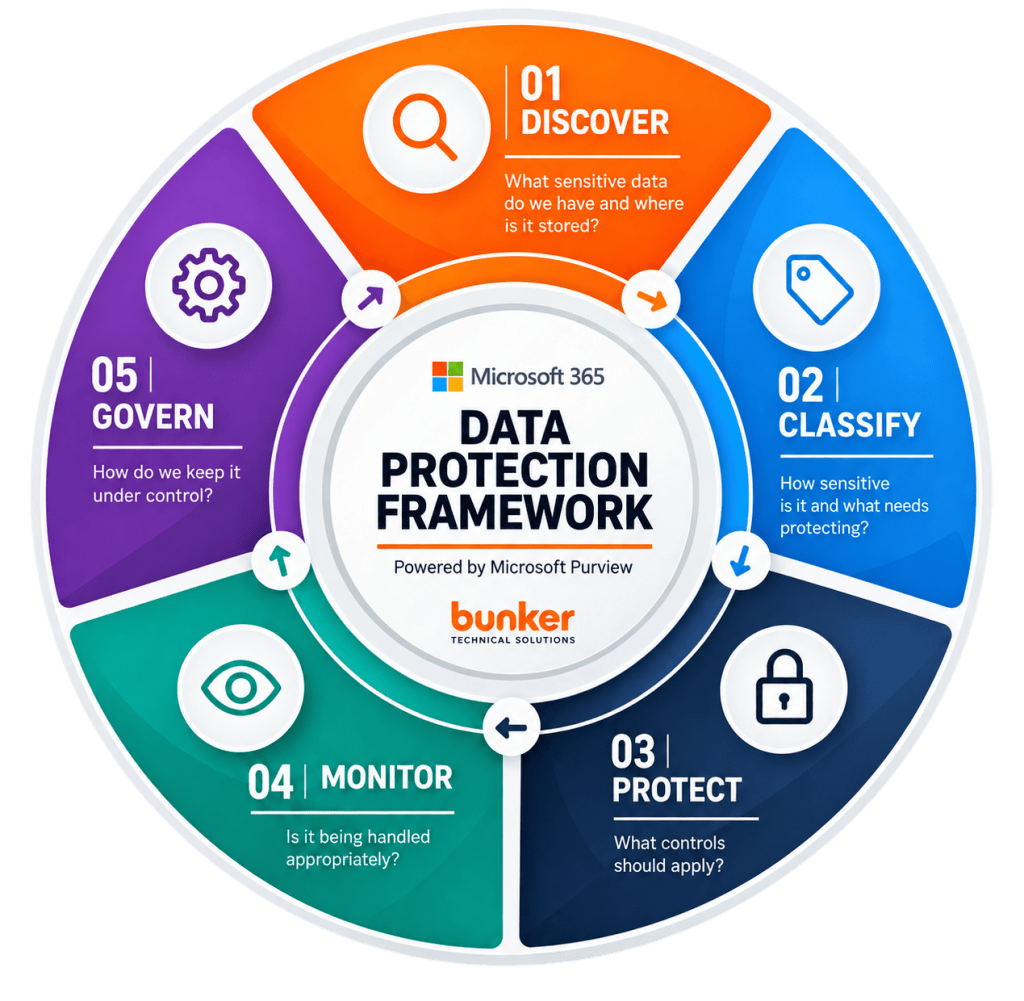





A FIVE-STAGE FRAMEWORK FOR DATA PROTECTION
Microsoft 365 contains your oraganisation’s most valuable information.
Our framework helps you protect it – today and as you prepare for Ai.





Find and understand where sensitive information lives across Microsoft 365
Decide what needs protecting and apply a classification model that makes sense
Apply the right controls to protect information based on its sensitivity and risk
Understand how information is being used, shared and accessed
Keep data under control with policies, retention, reviews and ongoing governance
Why it matters
Ai is making information easier to find, summarise and use. That’s powerful — but it also increases the impact of poor information management.
Before you deploy Microsoft Copilot or other AI tools organisation-wide, you need confidence that sensitive information is properly identified, classified, protected and governed.
REDUCE RISK
Lower the risk of data breaches, oversharing and compliance failures
MEET REQUIREMENTS
Support UK GDPR, Data Protection Act 2018 and sector-specific compliance obligations.
SUPPORT AI READINESS
Well-governed data is essential for safe and effective AI adoption.
IMPROVE EFFICIENCY
Help your teams find the information they need — without unnecessary risk.
OUR APPROACH
From understanding your current risks to implementing controls and maintaining good governance, we take a practical three-stage approach to protecting your Microsoft 365 data.
01
ASSESS
We assess your current Microsoft 365 environment to identify the biggest data protection risks, gaps and priorities.
- Data discovery and mapping
- Permissions and access review
- Sensitive data and sharing risks
- Microsoft 365 & Purview reviews
YOU RECEIVE
🟠 Data Protection Score
Prioritised findings showing your biggest risks and where to focus first.
02
PROTECT
We implement the right Microsoft 365 and Purview controls to protect sensitive information without making it harder for your people to work.
- Sensitivity labels and classification
- Data Loss Prevention (DLP)
- Encryption & info protection
- Access and sharing controls
YOU RECEIVE
🟠 Configured Protection Policies
Controls configured around your data, risks and requirements.
03
GOVERN
We help you keep data protection effective as your organisation, information and use of technology continue to change.
- Policies and procedures
- Monitoring and reporting
- Access and permission reviews
- Retention and lifecycle reviews
YOU RECEIVE
🟠 Ongoing Governance & Improvement
An ongoing process for reviewing risk and improving protection.
START WITH A DATA PROTECTION ASSESSMENT
Get a clear view of your Microsoft 365 data protection risks and a practical roadmap for improving them.
5 areas assessed · Data Protection Score · Prioritised recommendations · 30/60/90-day roadmap
Not ready to book? GET IN TOUCH
What is Microsoft Purview?
Microsoft Purview is a suite of Microsoft tools designed to help organisations understand, protect and govern information across Microsoft 365 and other data sources.
Depending on your Microsoft 365 licensing, Purview capabilities can include sensitivity labels, Data Loss Prevention (DLP), information protection, retention, records management, audit and risk management.
For most organisations, the important question isn’t simply “Do we have Purview?” but which capabilities do we need, and how should they be configured around our data and risks?
Does my organisation need Microsoft Purview?
If your organisation stores sensitive or confidential information in Microsoft 365, it is worth assessing whether Microsoft Purview capabilities could strengthen how that information is protected and governed.
This is particularly relevant if you hold personal data, financial information, HR records, customer or beneficiary information, contracts or other confidential documents.
Not every organisation needs every Purview capability. Bunker recommends starting by understanding what sensitive data you have, where it is stored, who can access it and how it is currently protected before deciding which controls to implement.
What does a Microsoft 365 Data Protection Assessment include?
Bunker’s Microsoft 365 Data Protection Assessment reviews your organisation across the five stages of our framework:
Discover → Classify → Protect → Monitor → Govern
We assess areas including data discovery, permissions and access, sensitive information, sharing risks, Microsoft 365 configuration and Purview readiness.
The assessment provides a Data Protection Score, prioritised findings and recommendations, and a practical 30/60/90-day improvement roadmap so you know where to focus first.
What is the difference between Microsoft Purview and Microsoft Defender?
Microsoft Defender and Microsoft Purview address different but complementary areas of security.
Microsoft Defender primarily helps protect users, identities, devices, applications and cloud environments against cyber threats.
Microsoft Purview focuses more heavily on the information itself — helping organisations identify, classify, protect and govern sensitive data.
A simple way to think about it is:
Defender helps protect your organisation from threats. Purview helps protect and govern your information.
For many organisations, effective Microsoft 365 security requires elements of both.
Can Microsoft Purview help prepare our organisation for Microsoft Copilot?
Yes. Data protection and information governance are important parts of preparing Microsoft 365 for Copilot.
Before expanding Copilot, organisations should understand where sensitive information is stored, how it is classified, who can access it and whether information is being overshared.
Microsoft Purview capabilities can form part of that approach by helping organisations identify sensitive information and apply appropriate protection and governance controls.
However, Purview isn’t a substitute for good Microsoft 365 permissions, security or AI governance. Copilot readiness should consider security, data, people, processes and governance together.
How can Bunker help with Microsoft 365 data protection?
Bunker helps organisations take a structured approach to protecting information held within Microsoft 365.
Our Microsoft 365 Data Protection Framework follows five stages:
Discover → Classify → Protect → Monitor → Govern
We can begin with a Microsoft 365 Data Protection Assessment to identify your current risks and priorities. From there, Bunker can help implement appropriate Microsoft 365 and Purview controls and establish an ongoing governance process.
The goal isn’t to deploy more Microsoft technology for the sake of it. It’s to ensure your organisation’s most important information receives the protection it actually needs.
